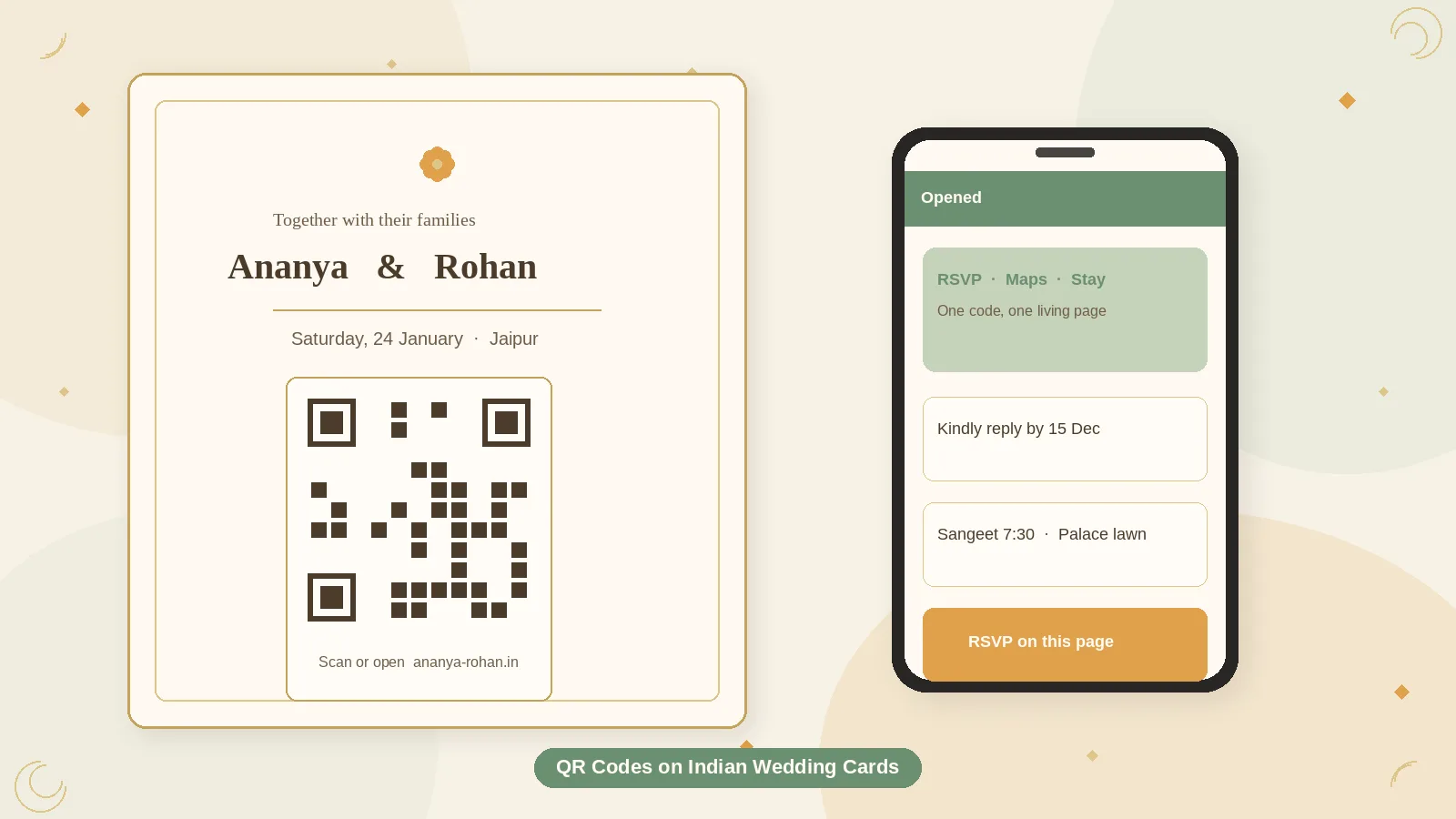
A QR code on an Indian wedding card is not a trend sticker. It is a bridge from a keepsake — foil, board, and a blessing line — to a page that can still change: maps, RSVP, dress notes, a gate that moved.
Used well, the code saves you from printing a novel. Used badly, it is an unreadable gold square on maroon textured board, and the uncle who will not scan has no other path.
This practical guide to QR codes on Indian wedding cards covers size, placement on traditional and contemporary suites, foil and dark-paper pitfalls, what the code should open, the typed URL you still need, and how to test before you print two hundred copies.
Give the code one job
The best default is one QR, one destination: a mobile wedding page that holds RSVP, schedule, and maps together. Guests should not have to guess which square is “the real one.”
Choose the landing page by what the paper already does:
- If the card is mostly names, date, and city, send the QR to a full guest page.
- If the card already lists functions and venues, send the QR straight to RSVP (with schedule still one tap away).
- If you are placing a code on a hotel welcome card, send it to that day’s schedule and shuttle, not the love story.
Weak destinations: an Instagram grid, a Google Drive folder, a PDF you will replace next week, a YouTube video with no times on screen, a generic homepage that buries the RSVP.
A mobile wedding website — including guest pages in the LoveSolutions style — is a natural landing place because you can update timings without reprinting the suite. The printed square should never point at a file you cannot redirect.
Size, contrast, and the quiet zone
Phones fail more often than designers expect: indoor yellow light, a slightly glossy laminate, an older Android, a guest scanning at arm’s length across a thali.
Practical targets (not laboratory folklore):
- Print the code at about 2.5–3 cm wide on a card. Tiny corner codes look elegant in the mock-up and fail at the dining table.
- Keep a blank margin around the code (the quiet zone). Paisley, foiled borders, and floral corners that touch the modules are a common reason scans bounce.
- Use dark modules on a light patch — charcoal or black on ivory or cream. Maroon-on-gold, gold-on-gold, and low-contrast sage-on-ivory look bridal and scan poorly.
- Prefer a vector (SVG) or a high-resolution PNG placed at print size. Do not screenshot a code from another phone and drop it into the layout.
- A short URL makes a simpler pattern. Long tracking links pack the square with tiny modules that cheaper cameras miss.
If you want a tinted code in wedding colours, test the printed proof, not the backlit design file. Ink is not a screen.
Where it sits on an Indian card
Traditional fronts are busy: gods, crests, dense borders, names in two scripts. That is a bad neighbourhood for a QR.
Better placements:
- Back of the main card — preserves the front art; guests who want details turn over.
- A separate details or RSVP insert — often the cleanest; you can give the square a headline: “Kindly reply” or “Schedule, maps, RSVP.”
- A calm corner on a contemporary front — only if there is real empty space, not a squeezed gap in the border.
- Belly band or envelope flap — possible, but easy to tear or throw away with the envelope.
Avoid:
- The most heavily foiled panel
- Across a fold
- So close to a rounded die-cut that the quiet zone is gone
- A second decorative QR that goes nowhere (guests will try it)
Add a short label. “Scan for RSVP and maps” beats an unexplained square that relatives treat as ornament.
Foil, texture, dark boards, and lamination
Indian print finishes fight cameras.
- Foil on the QR itself is a frequent fail. Metallic ink reflects. Keep the code in flat, dark ink.
- Heavy texture and embossing can break the camera’s focus. Park the code on a smooth inset if the rest of the board is linen or leatherette.
- Dark maroon, navy, or black boards need a light patch behind the code — a cream box, not modules printed directly on wine-coloured paper.
- Spot UV or glossy laminate over the code can flare under indoor lights. A matte patch is safer.
- Die-cut windows that show the code through another layer rarely survive alignment in bulk print.
Tell the printer, in writing, that the QR must remain scannable, high-contrast, and uncropped. Approve a true-size paper proof, not only a PDF on a laptop.
The typed URL is not optional
Many elders will not scan. Some phones will not. Some guests will photograph the card and forward a JPEG in which the code is too small to read.
Under the square, print a short URL a person can type or read aloud: yourwedding.in/rsvp rather than a 70-character string with parameters.
A line such as “Scan the code or open [short URL]” covers both habits. If you use a QR and no typed path, you have built an invite that only some of the family can finish.
What to put around the code (copy that helps)
Keep the insert human:
- Headline: “Kindly reply by 15 November”
- One line of what they will find: “Schedule, maps, stay notes, and RSVP”
- The short URL
- A named contact for people who will neither scan nor type
Do not put changeable shuttle times in 8-pt type next to the code. The page behind the code can hold those.
Test before you print the full run
- Freeze the destination URL. Changing it after print means reprints or a redirect you must remember to keep forever.
- Generate the code from that final URL.
- Place it at actual millimetre size on the real card layout.
- Print a proof on the real stock, with the real finish.
- Scan with an iPhone and a mid-range Android, in daylight and in indoor yellow light, from about 20–30 cm.
- Confirm the page is mobile, fast on ordinary data, and obviously the right wedding.
- Ask one person over 60 to try — scan or type. Watch where they hesitate.
If it only works on the designer’s flagship phone in the studio, it is not ready.
After the cards leave the house
Do not change the URL. If you must move the website, redirect the old address.
If timings shift, update the page, not the printed square. That is the point of the QR.
The same code can appear larger at the welcome desk, on a hotel key-packet, or on a simple easel near gifts — same destination, bigger print (think 8–10 cm on a sign meant to be scanned from a step away). Do not invent a second code that goes somewhere else.
A practical QR checklist
- [ ] One destination, decided and live
- [ ] Short URL chosen; redirect reserved if you rebrand the page
- [ ] Code about 2.5–3 cm on the card, with a quiet zone
- [ ] Dark on light; no foil on the modules
- [ ] Typed URL and a human label under the square
- [ ] Placement on back, insert, or a calm patch — not in dense front art
- [ ] True-size proof scanned on two phones, two lighting conditions
- [ ] Page works on mobile data
- [ ] Elders have a non-scan path
- [ ] Welcome-desk sign uses the same URL
Common mistakes
- Too small, too pretty. A 1.5 cm gold code in a floral corner is decoration.
- Linking to a file you will replace. Guests bookmark failure.
- Three codes for RSVP, maps, and Instagram. People pick the wrong one.
- No proof on real paper. Screens lie.
- QR-only, no URL. You have excluded the guests least comfortable with the card’s new trick.
FAQ
Is a QR code appropriate on a traditional Indian card?
Yes, if it is quiet and useful. Put it on the back or an insert so the front can stay classic. The code is manners — making details easy — not a style statement.
Should we put a QR on the digital invite as well?
A tappable link is better in WhatsApp than a code people must scan from a screenshot. Use QR on physical pieces; use a button or URL in chat.
Can we brand the code with a tiny monogram in the centre?
Only if you leave enough intact pattern and you test on older phones. A large logo in the middle is how codes die. When in doubt, skip the logo.
What if the printer crops the quiet zone?
Reject the proof. A cropped code is not “close enough.” Ask for a cream box around the square and reprint that element.
Closing thought
A QR code on an Indian wedding card earns its place when it is large enough to scan, dull enough to contrast, and honest about a typed URL for people who will never point a camera at dinner. One square, one living page, one proof that works on an ordinary phone — that is the whole craft.